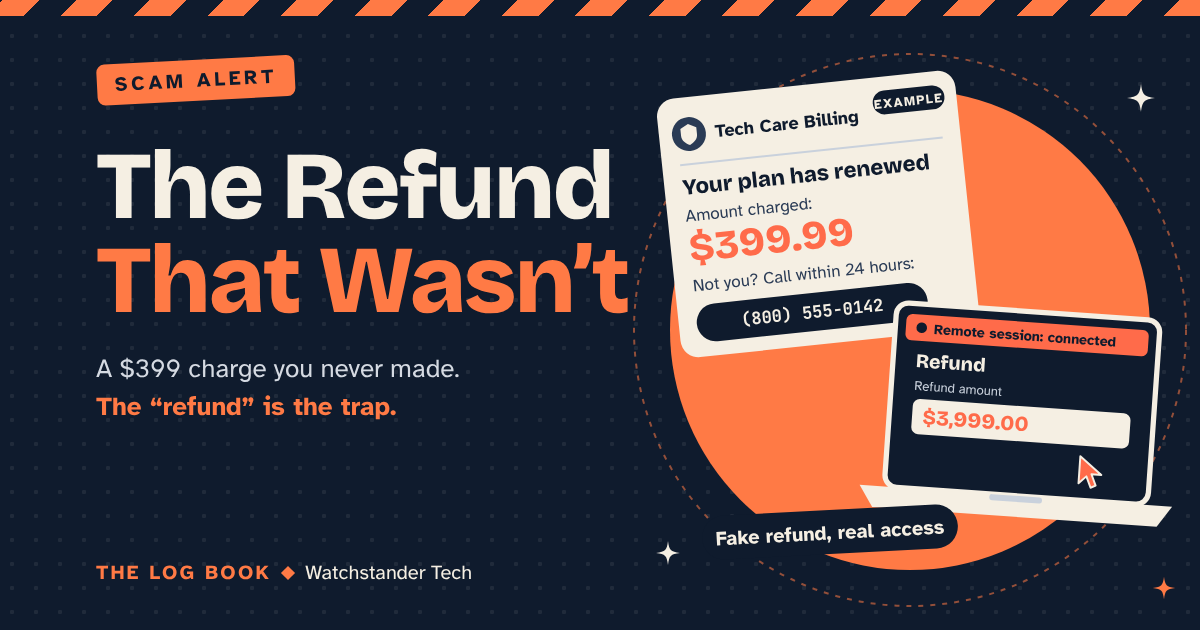
The email looks like a receipt. "Thank you for renewing your annual protection plan. Your account has been charged $399.99. If you did not authorize this renewal, call our billing team within 24 hours."
You don't remember signing up for anything. Four hundred dollars is real money. So you call the number, and a polite, patient person answers, saying they'd be happy to cancel it and get your money back.
That polite person is the scam. The email is just bait to get you on the phone, and the "refund" is how they get to your money.
Why I'm writing about this one
The FBI's Internet Crime Complaint Center groups these under "tech/customer support" scams: someone posing as a technical or customer support representative. In 2025, it logged nearly 48,000 complaints in that category, resulting in losses of more than $2.1 billion. Roughly 21,000 of those complaints and more than $1 billion in losses came from people over 60. About half the money, from one age group.
It reaches people in a few ways. A call from someone who says they're with Microsoft and your computer is sending out errors. A text or email about a subscription that just renewed, often using the name of a company you've heard of, like Geek Squad. A warning that takes over your screen with a number to call (that one gets its own post soon). What they share is that they contact you first, with a problem you didn't know you had.
How the refund trick works
You call to dispute the charge. The agent says they need to "connect to your computer" to process the refund. They walk you through installing a remote access program, which is software that lets someone else see your screen and control your mouse from anywhere. Real support teams use these tools too, so it doesn't feel strange.
Then they ask you to sign in to your bank so they can "send the refund." While they're connected, they fake a transaction so it looks like they refunded you far too much. Maybe $3,999 instead of $399. Suddenly, they're upset. They could lose their job. Could you please send back the difference?
And it has to be sent a particular way: gift cards, a wire transfer, cryptocurrency, or a payment app. The FTC points out why scammers like those: once you pay, it's hard to get your money back.
Notice what's being used against you: not greed, but honesty. You're trying to return money that isn't yours. That's what makes this one so cruel and so effective.
It can go further. The FBI has warned about a version it calls the "Phantom Hacker" scam, where the tech support caller is followed by someone posing as your bank, and then someone posing as a government agency, all telling you your savings aren't safe and need to be moved to a new "protected" account. The FBI is plain about it: the U.S. government will never ask you to send money by wire to a foreign account, by cryptocurrency, or with gift or prepaid cards.
The rule that stops it
Microsoft says it directly: it "will never proactively reach out to you to provide unsolicited PC or technical support." And its real error messages never include a phone number to call. That's true well beyond Microsoft. Real support waits for you to come to it.
So my rule is simple: if someone contacts you first, they don't get onto your computer. Not for a refund, not for a "quick check," not for anything.
What to do when one of these shows up:
- Don't call the number in the message. It goes straight to the scammer. The FTC's advice is to use a phone number you've verified yourself.
- Check it yourself. Look at your card statement or bank app, or sign in to the account the usual way. If there's no charge, there's nothing to refund.
- Never give remote access to someone who reached out to you. If a real company needs to help you, you'll be the one who calls them on a number you already trust.
- Never "pay back" a refund. A request to return money using gift cards, wire transfers, or crypto is the scam announcing itself.
It's the same move I recommended in the voice clone post: hang up, then reach out on your own terms.
For small businesses
The front desk gets these calls too, usually framed as a software license about to lapse or "security alerts" from your network. Make it a written rule that no one gives remote access to an incoming caller, and that tech help only comes through the person or company you already use, reached the way you normally reach them.
If it already happened
Hang up and end the remote session. The FTC's steps: update your security software, run a scan, and delete anything it flags. Change any password you typed while they were connected, starting with your bank and email (a password manager makes this much easier), and turn on two-factor authentication. Call your bank or card issuer using the number on the back of your card. If you bought gift cards, call the numbers on the back of those cards right away and tell them a scammer has them. Then report it at ReportFraud.ftc.gov and IC3.gov.
Stay sharp out there.
Andrew